The answer: Apple rates the AirTag replaceable CR2032 cell at over a year of battery life with everyday use. That rating is not a countdown for your tag, so watch for the Low Battery flag in Find My, replace the cell with a compatible bitterant-coated CR2032, and verify the tag responds before packing it away.
Table of contents
Apple lists the AirTag user-replaceable battery at over a year of battery life with everyday use. That sentence carries the whole maintenance story: it is a product rating under stated conditions, not a countdown running inside your tag. The practical signal is the Low Battery flag in Find My, followed by a replacement you verify while the item is still in your hand. Everything else in this guide supports those two moves.
Treat the rating as a rating, not a deadline
The “over a year” figure comes from Apple AirTag specifications and describes everyday use. Your use may not match the conditions behind it: frequent location checks, sounds, and Lost Mode activity all draw power, and any coin cell slowly loses capacity with age even sitting in a drawer. Independent coverage from outlets such as eufy and The Points Guy converges on roughly a year in normal use, which matches the rating without turning it into a promise for your battery.
Two dates also confuse owners. The day you bought the tag and the day you activated it can be months apart, and a tag that waited in a drawer started from a different point than one that traveled daily. Keep a plain note of the replacement date and which item holds the tag. That is enough; a spreadsheet of guessed percentages adds work without adding knowledge.
How you will know the battery is low
Apple describes two signals on its battery replacement page. The iPhone paired with the tag shows a low-battery notification, and the Find My app flags the item directly: open Find My, tap Items, select the AirTag, and look for Low Battery under its name.
Confirm you are reading the right tag before buying anything. Households with several tags named “Keys” or “Bag” should rename them during calm maintenance so a later warning is unambiguous. The label should identify the physical item at a glance without exposing personal details to anyone glimpsing your screen.
Timing matters more than precision. There is no reliable universal countdown of weeks between the warning and silence that this guide can give you, so act while you still hold the item. A warning discovered at the departure gate leaves fewer options than one found while packing.
Which replacement to buy
Apple specifies a CR2032 lithium 3V coin cell, available at most electronics and drug stores. Its current guidance recommends a bitterant-coated battery, names the coated Duracell 2032 as an example, and tells buyers to look for packaging that states compatibility with Apple AirTag. It also warns that some bitterant-coated cells may not work with the device, so the packaging statement matters more than the brand name alone.
| Fact | Detail | Source |
|---|---|---|
| Cell type | CR2032 coin battery | Apple battery replacement page |
| Chemistry and voltage | Lithium, 3V | Apple battery replacement page |
| Coating | Bitterant-coated, per current guidance | Apple battery replacement page |
| Compatibility check | Packaging states “Compatible with Apple AirTag” | Apple battery replacement page |
| Orientation | Positive side facing up | Apple battery replacement page |
| Confirmation | Tag makes a sound when the cell connects | Apple battery replacement page |
Older articles, including some still ranking, advise seeking an uncoated cell because early coated cells had contact problems. That advice is outdated: Apple changed its guidance to recommend a compatible coated cell that discourages accidental ingestion by children. Follow the current Apple page, not the older posts. Never scrape a coating off or modify a battery to force a fit; buy a proper compatible cell instead.
Replace the battery on a clear surface
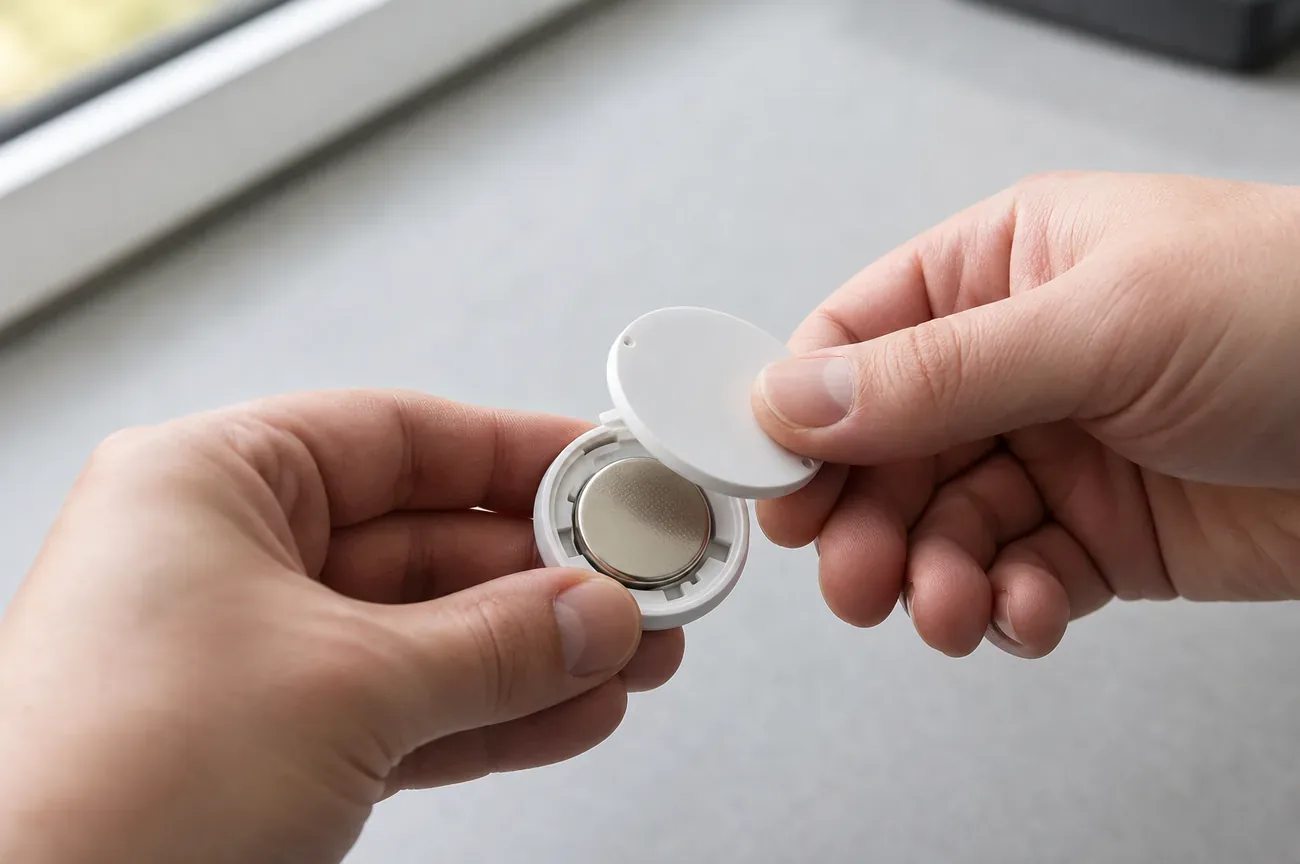
Work where the small cover and the old cell cannot roll away, and keep new and used coin cells away from children and pets throughout. Apple procedure:
- Press down on the polished steel battery cover and rotate it counterclockwise until it stops.
- Lift off the cover and remove the old battery.
- Insert the new CR2032 with the positive side facing up. The tag should make a sound showing the cell connected.
- Align the three tabs on the cover with the three slots on the tag.
- Rotate the cover clockwise until it stops.
If the mechanism feels unclear, re-read the Apple instructions with their illustrations rather than prying at the case or forcing a misaligned cover. Put the removed cell straight into a safe container for proper disposal, and finish securing the cover before returning the tag to its holder. Keep the old and new cells physically apart while you work so they cannot be mixed up.
Apple attaches a blunt ingestion warning to this procedure: a swallowed coin cell can cause internal chemical burns quickly, so batteries stay out of reach of children, and any suspected swallowing needs immediate medical attention. Take that warning literally with curious toddlers around.
Verify the replacement before packing the tag away
After closing the cover, open Find My, go to Items, and check the tag displayed status. With the tag nearby, use Play Sound if available to confirm you are interacting with the intended tag. This is a basic functional check, not a measurement of remaining life: “the tag responded after replacement” proves that response and nothing more.
Do this check on the desk, before the tag goes back into an awkward holder or deep into luggage. If something is wrong, it is far easier to investigate with the cover, the packaging, and a spare cell in reach than after the bag has left with someone else.
If the new battery does not work
Recheck the simple causes first: correct CR2032 type, positive side up, packaging compatibility statement, and the cover fully seated with its tabs aligned. If the package holds several cells, confirm you did not reinstall the old one by mistake.
If those checks fail, contact Apple support with a clean description: whether the tag sounded on insertion, whether it appears in Find My, and which compatible cell you used. Avoid scraping contacts, bending parts, adding improvised spacers, or following an unrelated reset ritual. A silent tag needs a focused assessment, not a succession of modifications.
A fresh battery does not guarantee fresh updates
Even with a new cell, a distant AirTag only appears on the map when a passing Apple device relays its Bluetooth signal to the network. A tag in an empty warehouse or a parked car in a quiet garage can sit silent for hours with a perfectly good battery. Check the timestamp and status in Find My before blaming the cell. Our AirTag network guide explains when quiet means coverage rather than power, and our AirTag review sets realistic expectations for what the tag does well and where it falls short.
Battery maintenance is not ownership
Swapping a cell says nothing about who owns or shares the tag. If you found a tag you did not place among your belongings, treat it as a potential unknown tracker first: our unknown-tracker guide walks through alerts and next steps on either platform. For your own tag, a battery swap is also a good moment to review the item name and sharing: moving it from your keys to a borrowed suitcase means telling the person carrying it.
Correction: this revision follows the current Apple guidance recommending a compatible bitterant-coated CR2032, replacing older uncoated-cell advice. It states no tested lifetimes, voltage thresholds, or brand rankings, because we performed no comparative battery testing.
Frequently asked questions
How long does an AirTag battery last?
Apple lists the user-replaceable CR2032 cell at over a year of battery life with everyday use in its AirTag specifications. That is a product rating, not a guaranteed lifetime for any individual battery. Real results vary with use and conditions, so treat the low-battery warning in Find My as the maintenance signal, not the calendar.
Which replacement battery should I buy for an AirTag?
Buy a CR2032 lithium 3V coin cell whose packaging states compatibility with Apple AirTag. Apple currently recommends a bitterant-coated cell, such as the coated Duracell 2032 it names, and warns that some coated cells may not work. Older advice to seek an uncoated cell is outdated; follow the current Apple battery replacement page.
How do I check whether my AirTag battery is low?
Open Find My, tap Items, and select the AirTag. If the charge is low, the words Low Battery appear under the item name. Apple also sends a low-battery notification to the paired iPhone. Check before a trip while you still hold the item, so you have time to buy a compatible cell and verify it.
Can I recharge an AirTag instead of replacing the battery?
No. AirTag has no charging port and no rechargeable cell; it runs on a replaceable CR2032 coin battery. When the low-battery warning appears, open the cover, swap in a fresh compatible cell with the positive side up, close the cover, and confirm the tag responds in Find My. The swap takes moments on a clear surface.
Why did my AirTag stop updating if the battery may be fine?
A distant AirTag report needs a passing Apple device to relay the Bluetooth signal to iCloud, so a tag can go quiet in an empty area with a healthy battery. Check the Find My status and timestamp before assuming the cell is dead. Our network guide explains when silence points at coverage rather than power.